Galileo HUD Dive Computer Compared: 6 Best Picks for Reef Divers (2026)
Comparing six galileo hud dive computer options for reef divers. See which Scubapro and Cressi models fit your diving style, with pros, cons and a buying guide.
 By Miles Sinclair
Updated November 21, 2026
 By Miles Sinclair
Updated November 2026
Choosing a galileo hud dive computer comes down to how you dive, how often you log dives, and whether a heads-up display or a wrist-style screen suits your eyes and your gear setup. This list compares six models on the criteria that matter most on reef and shore dives: display readability, air integration, transmitter options, nitrox range and ease of setup. Each pick is based on product listings, brand specifications and common owner feedback patterns. For another angle, check out 4 Best Cressi Goa Dive Computers for Reef Divers (2026).
Our top picks at a glance
- 1TOP CHOICEBest overallSCUBAPRO Galileo HUD Sport Dive Computer w/Transmitter Smart + ProView on Amazon
- 2
 TOP CHOICEBest for heads-up viewingScubapro Hud Pro (Heads-Up Display) Dive ComputerView on Amazon
- 3
 TOP CHOICEBest for wrist-style Bluetooth loggingSCUBAPRO G3 Wrist Scuba Dive Computer with Bluetooth® and Watch-Style Color DisplayView on Amazon
- 4
 Best for transmitter-based air dataSCUBAPRO Galileo 3 (G3) Wrist Dive Computer w/Transmitter Smart + ProView on Amazon
- 5
 Best for air-integrated simplicitySCUBAPRO Luna 2.0 Air Integrated (AI) Wrist Scuba Dive Computer with Bluetooth®View on Amazon
- 6
 Best budget-minded nitrox optionCressi Leonardo 2.0 G2 Dive Watch, One-Button Air Nitrox Gauge, White/View on Amazon
Our Top Picks
Quick Comparison
| Product | Best for | Key feature |
|---|---|---|
| SCUBAPRO Galileo HUD Sport Dive Computer | Overall all-round diving | HUD display with transmitter |
| Scubapro Hud Pro Dive Computer | Heads-up viewing | Large heads-up display |
| SCUBAPRO G3 Wrist Scuba Dive Computer | Bluetooth logging | Color watch-style display |
| SCUBAPRO Galileo 3 (G3) Wrist Dive Computer | Transmitter air data | Wireless tank pressure |
| SCUBAPRO Luna 2.0 Air Integrated Wrist Computer | Air-integrated simplicity | Built-in air integration |
| Cressi Leonardo 2.0 G2 Dive Watch | Nitrox on a budget | One-button air nitrox gauge |
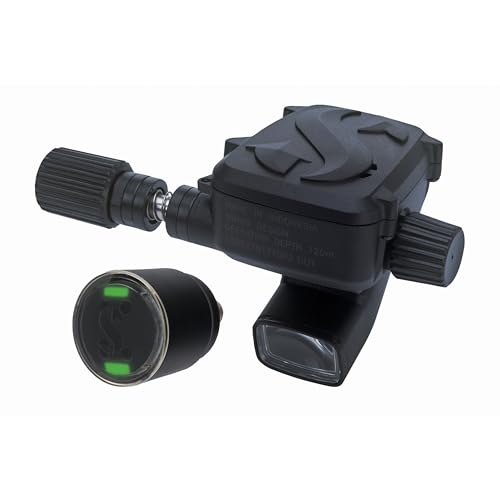
SCUBAPRO Galileo HUD Sport Dive Computer w/Transmitter Smart + Pro
SCUBAPRO Galileo HUD Sport Dive Computer w/Transmitter Smart + Pro
Best for: Overall all-round diving with air data and a heads-up view.
This is a good fit for divers who want a single computer that handles both dive planning and live air monitoring. Owners often describe the display as easy to read at a glance during ascents. A related read: 6 Best Galileo 3 Dive Computer Options for Reef Divers (2026).
Pros
- Heads-up display keeps depth and time in view.
- Transmitter option supports wireless tank pressure.
Cons
- Full feature set takes time to learn.
Scubapro Hud Pro (Heads-Up Display) Dive Computer
Scubapro Hud Pro (Heads-Up Display) Dive Computer
Best for: Heads-up viewing for divers who check the screen often.
Suited to divers who prefer a larger, face-up readout over a small wrist display. Manufacturers position it as a more visible option for dives with frequent gauge checks.
Pros
- Large, easy-to-scan heads-up layout.
- Clear information hierarchy for depth and no-stop time.
Cons
- Bulkier than a standard wrist computer.
SCUBAPRO G3 Wrist Scuba Dive Computer with Bluetooth® and Watch-Style Color Display
SCUBAPRO G3 Wrist Scuba Dive Computer with Bluetooth® and Watch-Style Color Display, Includes Case, Silicone Arm Strap, USB Cable, Charging Dongle and Lanyard
Best for: Wrist-style Bluetooth logging with a color display.
A solid choice for divers who want to sync dive logs to a phone after each day of diving. Owners often mention the watch-style fit as comfortable on land and underwater.
Pros
- Bluetooth syncing simplifies logbook entries.
- Color display is readable in typical reef light.
Cons
- Without air integration, tank pressure must be tracked separately.
SCUBAPRO Galileo 3 (G3) Wrist Dive Computer w/Transmitter Smart + Pro
SCUBAPRO Galileo 3 (G3) Wrist Dive Computer w/Transmitter Smart + Pro
Best for: Transmitter-based air data on a wrist computer.
Aimed at divers who want wireless tank pressure without a hose-mounted gauge. It suits anyone already comfortable with transmitter setup and battery checks.
Pros
- Wireless transmitter reports tank pressure to the wrist.
- Smart and Pro modes cover a range of diving styles.
Cons
- Transmitter pairing adds an extra step before each dive.
SCUBAPRO Luna 2.0 Air Integrated (AI) Wrist Scuba Dive Computer with Bluetooth®
SCUBAPRO Luna 2.0 Air Integrated (AI) Wrist Scuba Dive Computer with Bluetooth®, Includes Case and Silicone Arm Strap
Best for: Air-integrated simplicity without a separate gauge. Worth reading next: 6 Best OSTC Dive Computer Reviews Compared for Reef Divers (2026).
Works well for divers who want one unit to handle depth, time and air. It is a practical option for those who prefer fewer hoses and gauges on the console.
Pros
- Built-in air integration reduces gear clutter.
- Bluetooth connectivity supports log downloads.
Cons
- Air integration ties the unit to compatible regulators.
Buying Guide
Display Type: Heads-Up Display vs. Wrist Screen
A heads-up display (HUD) model shows dive data on a screen mounted near your mask, so you can read depth, time and air without looking down at your wrist. Wrist-style computers are easier to slip on and off and often feel more familiar, especially for divers who already wear a watch on land.
Air Integration
Air-integrated models receive tank pressure from a transmitter on your first stage, which lets the computer show remaining gas and estimate how long your air will last. If you dive with a single tank and want to track gas consumption, look for a transmitter-compatible model and confirm the transmitter is included or sold separately.
Nitrox and Gas Range
If you plan to dive enriched air, check the supported oxygen fraction range and the maximum partial pressure of oxygen the unit allows. Recreational reef divers often use standard air or nitrox blends in the lower range, but a wider range gives you more flexibility as your training progresses.
Ease of Setup and Software
Bluetooth connectivity and companion app support make it simpler to download dive logs, update firmware and review your profiles after a day on the water. Consider how comfortable you are with menu navigation, since some one-button or simplified interfaces are quicker to learn than full-color touchscreen systems.
Budget and Long-Term Use
Think about how often you will dive and whether you may add accessories later, such as a transmitter or a second computer for backup. A model that covers your current needs with room to grow often provides better value than one that either exceeds your requirements or will need replacing sooner.
FAQ
Is a heads-up display better than a wrist computer for reef diving?
Neither is better for every diver. A heads-up display keeps data in your line of sight, which many people find helpful on reef dives where they watch fish and check their gauges at the same time. Wrist computers are simpler to manage and may feel more natural if you prefer a conventional setup.
Do I need an air transmitter to use a dive computer?
No, a dive computer can calculate no-decompression limits and depth without a transmitter. A transmitter adds tank pressure and air-time information, which many divers find useful for monitoring gas on each dive. Whether it is worth the added setup depends on how you like to track your air.
What is nitrox, and do I need a computer that supports it?
Nitrox is breathing gas with a higher oxygen percentage than regular air, and it can extend bottom time on certain dives. If you plan to take a nitrox course or already hold a certification, choose a computer that lists the oxygen range you intend to use. Recreational divers who stick to air may not need this feature.
How do I keep my dive computer updated?
Most current models connect to a companion app or computer through Bluetooth or a cable, which allows you to download logs and install firmware updates. Check the manufacturer’s instructions before each update and keep the battery charged during the process. Regular updates can add features and fix software issues.
Can a dive computer be used by beginners?
Yes, many models are designed with simplified menus and clear displays that suit new divers. It is still important to complete proper dive training and understand the computer’s alerts before relying on it. Read the manual and practice with the settings on land first.
Conclusion
If you want a heads-up display that keeps key data in front of your mask, the Galileo HUD models suit divers who value quick, hands-free readings during reef dives. Wrist-style options such as the G3 and Galileo 3 are a good fit for those who prefer a familiar watch-style layout with air integration available.
Budget-minded divers who want a simpler, air-integrated wrist unit may find the Luna 2.0 a practical choice, while those who want a different feature set can look at the Cressi Leonardo 2.0 for its one-button operation and nitrox range. Match the display type, air tracking and gas range to how you actually dive, and the right model will be clear.
Related reading
- Zoop Suunto Dive Computer: A Step-by-Step Setup and Buying Guide
- Zoop Dive Computer Price: What to Expect and How to Shop Smart
- Wrist Mounted Dive Computer: A Step-by-Step Guide for Choosing and Using One
- Wrist Mount Dive Computer: Is It Right for You? Setup and Tips
About Miles Sinclair
Miles Sinclair is part of our editorial team and reviews and edits our scuba diving gear guides, checking product details against manufacturer specifications and owner feedback.
About the author
Miles Sinclair writes reviews and buying guides for Scuba Lanai.