Galileo Luna Dive Computer Review: 5 Best Models Compared for Reef Divers (2026)
Galileo Luna dive computer review with 5 compared models, plus what to check on a wrist computer, from display and air integration to Bluetooth and battery.
 By Miles Sinclair
Updated November 22, 2026
 By Miles Sinclair
Updated November 2026
If you are looking for a galileo luna dive computer review, you are probably trying to decide between a Luna-class wrist unit and the other SCUBAPRO models that share its interface. This list compares five SCUBAPRO and Cressi dive computers against four criteria: air integration, display readability in low light, Bluetooth logging, and how well each suits reef diving at recreational depths.
Our top picks at a glance
- 1TOP CHOICEBest overallSCUBAPRO Luna 2.0 Air Integrated (AI) Wrist Scuba Dive Computer with BView on Amazon
- 2
 TOP CHOICEBest for watch-style displaySCUBAPRO G3 Wrist Scuba Dive Computer with Bluetooth® and Watch-StyleView on Amazon
- 3
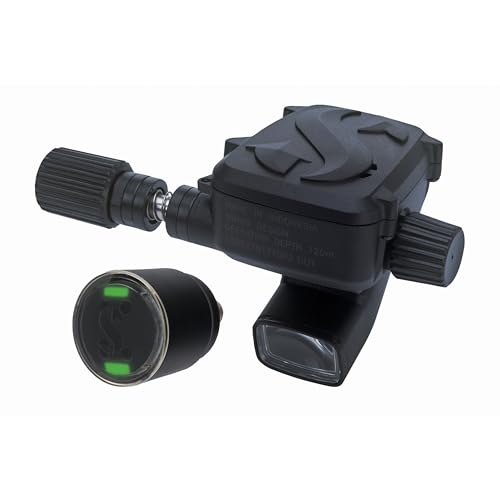 TOP CHOICEBest for heads-up dataSCUBAPRO Galileo HUD Sport Dive Computer w/Transmitter Smart + ProView on Amazon
- 4
 Best for tech-style dive planningSCUBAPRO Galileo 3 (G3) Wrist Dive Computer w/Transmitter Smart + ProView on Amazon
- 5
 Best budget pickCressi Leonardo 2.0 Dive Watch, Scuba Dive Computer, Black/Yellow, G2View on Amazon
Our Top Picks
| Product | Best for | Key feature |
|---|---|---|
| SCUBAPRO Luna 2.0 AI | Reef divers wanting air integration | Built-in tank pressure |
| SCUBAPRO G3 Wrist | Divers who prefer a watch look | Color display, Bluetooth |
| SCUBAPRO Galileo HUD Sport | Divers wanting heads-up readouts | Transmitter-based data |
| SCUBAPRO Galileo 3 (G3) Wrist | Divers planning deeper profiles | Multi-gas planning modes |
| Cressi Leonardo 2.0 | Budget-minded beginners | Single-button control |
SCUBAPRO Luna 2.0 Air Integrated (AI) Wrist Scuba Dive Computer with Bluetooth®, Includes Case and Silicone Arm Strap
SCUBAPRO Luna 2.0 Air Integrated (AI) Wrist Scuba Dive Computer with Bluetooth®, Includes Case and Silicone Arm Strap
Best for: Reef divers who want tank pressure on the same screen as depth and no-deco time.
This is the Luna model most directly related to the galileo luna dive computer review query. It suits recreational divers who already breathe from a single tank and want one wrist unit to handle the dive profile and air supply.
Pros
- Air integration removes a separate pressure gauge from the setup.
- Bluetooth lets you pull dive logs to a phone after a day of diving.
Cons
- Integration requires a compatible transmitter on the first stage.
SCUBAPRO G3 Wrist Scuba Dive Computer with Bluetooth® and Watch-Style Color Display, Includes Case, Silicone Arm Strap, USB Cable, Charging Dongle and Lanyard
SCUBAPRO G3 Wrist Scuba Dive Computer with Bluetooth® and Watch-Style Color Display, Includes Case, Silicone Arm Strap, USB Cable, Charging Dongle and Lanyard
Best for: Divers who want a readable color screen that also works as an everyday watch.
The G3 wrist unit fits divers who spend time on the surface between dives and want a display that looks like a regular watch.
Pros
- Color display is easier to read than many monochrome screens.
- Includes a charging dongle and USB cable in the box.
Cons
- Battery life on the color screen is shorter than on simpler displays.
SCUBAPRO Galileo HUD Sport Dive Computer w/Transmitter Smart + Pro
SCUBAPRO Galileo HUD Sport Dive Computer w/Transmitter Smart + Pro
Best for: Divers who want heads-up data visible at a glance during a dive.
This model fits divers who mount their computer on the console or prefer data in a larger field of view than a wrist unit gives.
Pros
- Heads-up layout makes depth and time easy to read at a glance.
- Transmitter option adds tank pressure data.
Cons
- Bulkier than wrist units, which can snag on gear.
SCUBAPRO Galileo 3 (G3) Wrist Dive Computer w/Transmitter Smart + Pro
SCUBAPRO Galileo 3 (G3) Wrist Dive Computer w/Transmitter Smart + Pro
Best for: Divers planning deeper or more complex profiles with gas switches.
This unit suits divers who want planning features beyond basic recreational limits and who expect to use nitrox or multiple gases.
Pros
- Supports multi-gas planning for more complex dive profiles.
- Transmitter pairing adds real-time tank data.
Cons
- More settings to learn before the first dive.
Cressi Leonardo 2.0 Dive Watch, Scuba Dive Computer, Black/Yellow, G2
Cressi Leonardo 2.0 Dive Watch, Scuba Dive Computer, Black/Yellow, G2 | Dive Computer, Air Nitrox Gauge Modes, Single-Button Control, Visual & Audible Alarm, USB & Infrared Transfer, Diving Watch
Best for: Budget-minded divers who want a simple computer with air gauge modes.
This is a straightforward option for beginners who want depth, time and air tracking without a lot of menus.
Pros
- Single-button control is simple to learn.
- Includes air nitrox gauge modes and a visual and audible alarm.
Cons
- Older interface, and no Bluetooth logging.
Buying Guide
Air integration vs. standalone
Air-integrated units show tank pressure on the same screen as dive data, which removes a separate gauge. Standalone units are simpler and often cheaper to replace if damaged.
Display type and low-light readability
Color screens are easier to read in varied light, but they usually drain batteries faster. Check whether the display stays legible at a quick glance during an ascent.
Bluetooth logging and software
Bluetooth lets you download dive logs to a phone or computer. Confirm the manufacturer’s app supports your device before buying.
FAQ
Is the Galileo Luna a good choice for reef diving?
The Luna-class wrist units are well suited to reef diving at recreational depths because they focus on clear, simple information that is easy to read during a dive. Their interface is designed for quick glances, which helps when you are watching marine life and monitoring your bottom time at the same time.
What is the difference between an air integrated and a standalone dive computer?
An air integrated computer connects to your first stage regulator and shows your tank pressure and remaining air time directly on the wrist unit. A standalone computer does not connect to your tank, so you would need a separate pressure gauge to track your air supply.
Do I need Bluetooth on my dive computer?
Bluetooth is not strictly required, but it makes downloading and reviewing your dive logs much easier through a phone or computer app. If you plan to keep detailed records or update firmware regularly, Bluetooth models are generally more convenient.
Which display type is easier to read in low light?
Displays with strong contrast and clear backlighting tend to be easier to read in dim water, especially at depth or on night dives. Compare how each screen handles low light before you commit, since readability can matter more than extra features once you are underwater.
Can I use a dive computer that is not air integrated if I already have a pressure gauge?
Yes, a standalone computer paired with a separate pressure gauge can work well, and many divers prefer this setup for simplicity. Just make sure you check your gauge regularly, since you will not have the tank pressure reading on the same display as your dive data.
Are these dive computers suitable for beginners?
Many of these models are used by newer divers because their menus and alarms are relatively straightforward. Beginners should still complete proper training and read the manual thoroughly, and they should make sure the computer’s settings match their certification and planned dive profile.
Conclusion
If you want air integration and a larger, easy-to-read display with Bluetooth logging, the SCUBAPRO Luna 2.0 Air Integrated and the Galileo models are strong options for reef diving at recreational depths. If you prefer a simpler, standalone wrist computer with a focus on essential dive data, the Cressi Leonardo 2.0 or a standalone SCUBAPRO model may suit you better.
For most reef divers, the best choice comes down to whether you want air integration and how much you value Bluetooth logging and low-light readability. Consider your typical dive profile and your budget, then pick the model whose interface feels most comfortable to use underwater.
Related reading
- Suunto Dive Computer Reviews: 5 Models Compared for Reef Divers (2026)
- Mares Smart Dive Computer Review: 6 Models Compared for Reef Divers
- Galileo HUD Dive Computer Compared: 6 Best Picks for Reef Divers (2026)
- Deepblu Dive Computer Review: Features, Setup and Who Should Buy It
About Miles Sinclair
Miles Sinclair is part of our editorial team and reviews and edits our scuba diving gear guides, checking product details against manufacturer specifications and owner feedback.
About the author
Miles Sinclair writes reviews and buying guides for Scuba Lanai.