6 Best Galileo 3 Dive Computer Options for Reef Divers (2026)
Compare six galileo 3 dive computer options by use case, display, and wrist fit. Find the right Galileo 3 model for your reef, wreck, or technical diving.
 By Miles Sinclair
Updated November 21, 2026
 By Miles Sinclair
Updated November 2026
Choosing a galileo 3 dive computer comes down to how you dive, how you read your data, and whether you want a wrist unit or a console. This list compares six SCUBAPRO and Aqualung-style options against four practical criteria: display clarity, dive mode flexibility, transmitter and Bluetooth compatibility, and how well each unit suits recreational reef work versus deeper or gas-switching dives.
Our top picks at a glance
- 1TOP CHOICEBest overallSCUBAPRO G3 Wrist Scuba Dive ComputerView on Amazon
- 2
 TOP CHOICEBest for transmitter pairingSCUBAPRO Galileo 3 (G3) Wrist Dive Computer w/Transmitter Smart + ProView on Amazon
- 3
 TOP CHOICEBest for titanium durabilitySCUBAPRO Galileo 3 Ti Wrist Dive ComputerView on Amazon
- 4
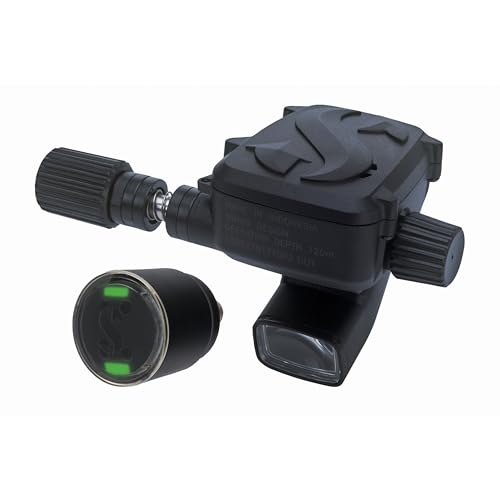 Best for heads-up displaySCUBAPRO Galileo HUD Sport Dive Computer w/Transmitter Smart + ProView on Amazon
- 5
 Best for gas-switching consoleAqualung i550C Dive ComputerView on Amazon
- 6
 Best budget wrist pickCressi Leonardo 2.0 G2 Dive Watch, One-Button Air Nitrox Gauge, White/View on Amazon
Our Top Picks
| Product | Best for | Key feature |
|---|---|---|
| SCUBAPRO G3 Wrist Dive Computer | Everyday recreational diving | Color watch-style display |
| Galileo 3 w/Transmitter Smart + Pro | Air integration fans | Transmitter pairing option |
| Galileo 3 Ti Wrist Dive Computer | Frequent salt-water use | Titanium case construction |
| Galileo HUD Sport | Divers wanting glanceable data | Heads-up display layout |
| Aqualung i550C | Nitrox and multi-gas divers | Three-gas capability |
| Cressi Leonardo 2.0 G2 | Nitrox beginners on a budget | One-button gas switching |
SCUBAPRO G3 Wrist Scuba Dive Computer
SCUBAPRO G3 Wrist Scuba Dive Computer with Bluetooth® and Watch-Style Color Display, Includes Case, Silicone Arm Strap, USB Cable, Charging Dongle and Lanyard
Best for: Everyday recreational diving with a clean, readable interface.
This is a solid all-round wrist unit for divers who want the Galileo 3 platform without extra accessories. It suits reef and shore divers who check depth and time often and prefer a watch-style display.
Pros
- Color display is easy to read at a glance.
- Includes case, strap, and charging accessories.
Cons
- Bundled accessories add bulk to a kit you may not need.
SCUBAPRO Galileo 3 (G3) Wrist Dive Computer w/Transmitter Smart + Pro
SCUBAPRO Galileo 3 (G3) Wrist Dive Computer w/Transmitter Smart + Pro
Best for: Transmitter pairing and air integration.
This version is aimed at divers who want tank pressure data and a more connected setup. It fits people who already dive with an air-integrated system and want their computer to match.
Pros
- Transmitter option supports tank pressure monitoring.
- Pro configuration suits more advanced planning.
Cons
- Transmitter adds setup steps and a separate battery to track.
SCUBAPRO Galileo 3 Ti Wrist Dive Computer
SCUBAPRO Galileo 3 Ti Wrist Dive Computer
Best for: Titanium durability for frequent salt-water use.
Titanium cases resist corrosion and wear better than many polymer housings. This model suits divers who dive often, rinse gear hard, and want a longer-lived wrist unit.
Pros
- Titanium construction is well suited to salt-water exposure.
- Same Galileo 3 interface as the standard wrist model.
Cons
- Titanium cases generally cost more to buy than polymer equivalents.
SCUBAPRO Galileo HUD Sport Dive Computer w/Transmitter Smart + Pro
SCUBAPRO Galileo HUD Sport Dive Computer w/Transmitter Smart + Pro
Best for: Heads-up display layouts for glanceable data.
The HUD layout pushes key numbers to the top of the screen for quick reading mid-dive. It suits divers who find smaller watch faces hard to read and who want depth and time shown first.
Pros
- Heads-up layout puts critical numbers front and center.
- Transmitter option is included in the Smart + Pro setup.
Cons
- Sport styling may not appeal to divers who prefer a classic watch look.
Aqualung i550C Dive Computer
Aqualung i550C Dive Computer – Versatile Durable 3-Gas Computer Console with 3 Dive Modes, Bluetooth Data Transfer, Nitrox Mix Capability & Water Activation, Computer w/Compass
Best for: Nitrox and multi-gas divers who want console-style control.
This console unit supports multiple gas mixes and includes a built-in compass. It suits divers doing nitrox, deeper sport work, or diving with a stick-mounted setup rather than a wrist strap.
Pros
- Three-gas capability and multiple dive modes.
- Bluetooth data transfer and built-in compass.
Cons
- Console form factor is bulkier than a wrist unit.
Buying Guide
Wrist Unit or Console
A wrist computer like the Galileo 3 line is compact, easy to read at a glance, and simple to manage on a reef dive. A console-style unit such as the Aqualung i550C is bulkier but often gives you a larger display and more room for gas-switching information, which can matter if you plan to dive nitrox or use multiple gases.
Display Clarity and Readability
Look at how the screen performs in bright sunlight, murky water, and low light. Color displays can make depth, time, and ascent-rate warnings easier to interpret quickly, especially when you are tired or working in current. Check that the layout lets you see the information you rely on most without digging through menus.
Dive Mode Flexibility and Gas Support
Think about the kinds of dives you actually do. Recreational air diving on reefs needs less than nitrox work, and both differ from dives that involve adjustable oxygen fractions or several gas mixes. Units such as the Cressi Leonardo 2.0 G2 offer defined oxygen and partial-pressure ranges, while the i550C covers more complex multi-gas setups. Match the feature set to your training and your planned profiles rather than buying for features you will never use.
Transmitter and Bluetooth Compatibility
If you want to connect with an air-integrated transmitter or sync data to a phone, confirm that the model supports your setup. Some SCUBAPRO units pair with a transmitter for tank pressure readouts, while others focus on Bluetooth logbook transfer. Check compatibility with your regulator, tank hardware, and smartphone before you commit.
FAQ
Is the Galileo 3 suitable for beginners?
Many Galileo 3 models are designed for recreational divers who have completed open water training. Beginners should make sure they understand the computer’s modes, alarms, and conservatism settings before diving. Working through the manual and practicing on land is a good idea.
Do I need a transmitter with a Galileo 3 dive computer?
A transmitter is optional for many divers but useful if you want tank pressure shown on your wrist or console. Units sold with a transmitter already include it, while others may require a separate purchase. Confirm what is included before ordering.
What is the difference between the standard G3 and the Ti version?
The Ti model uses a titanium case, which many divers prefer for durability and a premium feel. Core dive functions are generally similar between the two. Your choice may come down to budget and personal preference for materials.
Can I use nitrox with these dive computers?
Several models in this list support nitrox, and the Cressi Leonardo 2.0 G2 offers a defined oxygen fraction range for air and nitrox work. Always set the oxygen percentage correctly before each dive. Nitrox use also requires proper certification.
How do I transfer dive logs from my computer?
Models with Bluetooth can typically sync logs to a companion app on your phone. Others may use a USB cable or dock to download data to a computer. Check the manufacturer’s instructions for your specific model and app.
Conclusion
If you want a compact, easy-to-read wrist unit for everyday reef diving, the standard Galileo 3 or the titanium Ti model is a strong fit, with the Galileo HUD suiting divers who want a sport-focused display. If you plan more technical or multi-gas dives and prefer a larger screen, the Aqualung i550C is the better match.
Divers focused on nitrox and oxygen-fraction control may prefer the Cressi Leonardo 2.0 G2, while those who value transmitter integration should look closely at the SCUBAPRO models that pair with one. Match the unit to your training, your gas plans, and how you prefer to read your data.
Related reading
- Galileo HUD Dive Computer Compared: 6 Best Picks for Reef Divers (2026)
- Zoop Suunto Dive Computer: A Step-by-Step Setup and Buying Guide
- Zoop Dive Computer Price: What to Expect and How to Shop Smart
About Miles Sinclair
Miles Sinclair is part of our editorial team and reviews and edits our scuba diving gear guides, checking product details against manufacturer specifications and owner feedback.
About the author
Miles Sinclair writes reviews and buying guides for Scuba Lanai.