Scubapro Wrist Dive Computer Compared: 6 Best Picks for 2026
Compare the 6 best scubapro wrist dive computer models for reef, air-integrated and tech diving. Specs, pros, cons and who each one suits.
 By Miles Sinclair
Updated November 23, 2026
 By Miles Sinclair
Updated November 2026
Choosing a scubapro wrist dive computer comes down to how you dive, how much you want to rely on wireless features, and whether you plan to go deeper or stay on the reef. This list compares six Scubapro wrist models sold on Amazon US, covering air-integrated, Bluetooth-equipped and technical-leaning units. Each pick was judged on published specifications, Scubapro’s reputation for this product line, and the recurring themes owners describe in their feedback, such as display readability, battery habits and mounting comfort. Nothing here reflects personal testing.
Our top picks at a glance
- 1TOP CHOICEBest overallSCUBAPRO Luna 2.0 Air Integrated (AI) Wrist Scuba Dive ComputerView on Amazon
- 2
 TOP CHOICEBest for air-integrated reef divingSCUBAPRO Galileo 2 Wrist Diving ComputerView on Amazon
- 3
 TOP CHOICEBest for watch-style displaySCUBAPRO G3 Wrist Scuba Dive ComputerView on Amazon
- 4
 Best for technical divingSCUBAPRO G2 Tek Wrist Dive ComputerView on Amazon
- 5
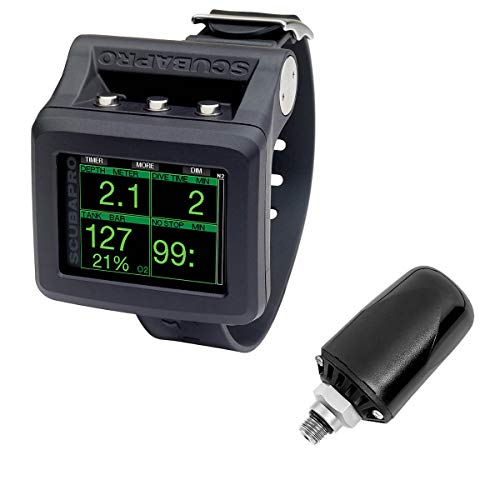 Best budget pickSCUBAPRO G2 Wrist Diving Computer with TransmitterView on Amazon
- 6
 Best for transmitter-based tank monitoringSCUBAPRO Galileo 3 (G3) Wrist Dive Computer w/Transmitter Smart + ProView on Amazon
Our Top Picks
Quick Comparison
| Product | Best for | Key feature |
|---|---|---|
| SCUBAPRO Luna 2.0 Air Integrated (AI) Wrist Scuba Dive Computer | Divers who want air-integrated data and Bluetooth logging | Air integration with Bluetooth connectivity |
| SCUBAPRO Galileo 2 Wrist Diving Computer | Recreational reef divers wanting a straightforward wrist unit | Simple, dedicated wrist display |
| SCUBAPRO G3 Wrist Scuba Dive Computer | Divers who prefer a watch-like color screen | Color display with Bluetooth |
| SCUBAPRO G2 Tek Wrist Dive Computer | Technical and deeper-diving users | Technical-oriented algorithm and gas options |
| SCUBAPRO G2 Wrist Diving Computer with Transmitter | Budget-minded divers wanting tank pressure data | Wireless transmitter for air pressure |
| SCUBAPRO Galileo 3 (G3) Wrist Dive Computer w/Transmitter Smart + Pro | Divers wanting a full-featured, transmitter-equipped unit | Transmitter plus smart and pro modes |
SCUBAPRO Luna 2.0 Air Integrated (AI) Wrist Scuba Dive Computer
SCUBAPRO Luna 2.0 Air Integrated (AI) Wrist Scuba Dive Computer with Bluetooth®, Includes Case and Silicone Arm Strap
Best for: Divers who want air-integrated data and Bluetooth logging in one wrist unit
This suits divers who want to see tank pressure and dive data together without a separate console. It fits people who already log dives digitally and want those logs to sync with a phone.
Key specs
- Air Integrated (AI) tank pressure monitoring
- Bluetooth connectivity
- Ships with case and silicone arm strap
Pros
- Air-integrated pressure readout reduces separate gauges
- Bluetooth allows dive log syncing
- Includes case and strap out of the box
Cons
- Air integration requires compatible transmitter setup
- Wrist-mounted display can be small for some users
Bottom line: A strong overall choice for recreational divers who want air integration and digital logging without spending time on a complicated interface.
View on AmazonSCUBAPRO Galileo 2 Wrist Diving Computer
SCUBAPRO Galileo 2 Wrist Diving Computer
Best for: Recreational reef divers who want a straightforward wrist unit with air-integrated options
This is a practical pick for divers who mostly stay within recreational limits and want clear, uncluttered data during a dive. Owners often describe it as easy to read underwater.
Key specs
- Wrist-mounted dive computer
- Air-integrated configuration available
Pros
- Simple layout suits beginners
- Dedicated wrist display is easy to glance at
- Well-established product line from Scubapro
Cons
- Fewer connectivity features than newer models
- Less suited to advanced technical profiles
Bottom line: Best for divers who want a dependable, no-frills wrist computer for reef and recreational dives.
View on AmazonSCUBAPRO G3 Wrist Scuba Dive Computer
SCUBAPRO G3 Wrist Scuba Dive Computer with Bluetooth® and Watch-Style Color Display, Includes Case, Silicone Arm Strap, USB Cable, Charging Dongle and Lanyard
Best for: Divers who prefer a watch-style color display and Bluetooth connectivity
This model appeals to divers who like a modern, phone-like interface and want to review dive data on a bright screen. It also suits those who appreciate having charging and data cables included.
Key specs
- Watch-style color display
- Bluetooth connectivity
- Includes case, silicone arm strap, USB cable, charging dongle and lanyard
Pros
- Color display is clear for reviewing data
- Bluetooth supports log transfer
- Accessories are included
Cons
- Color screens use more battery than basic displays
- Requires charging and regular care
Bottom line: A good fit for divers who want a modern display and full accessory kit.
View on AmazonSCUBAPRO G2 Tek Wrist Dive Computer
SCUBAPRO G2 Tek Wrist Dive Computer
Best for: Technical and deeper-diving users who need a wrist unit with technical-oriented features
This is aimed at divers who plan to go beyond standard recreational limits or want a computer configured for technical planning. Read the manual carefully and take technical training before using any technical mode.
Key specs
- Wrist-mounted technical-oriented dive computer
Pros
- Built for technical-style diving profiles
- Robust wrist unit from an established brand
- Suits divers who already understand gas planning
Cons
- More complex than recreational models
- Overkill for casual reef diving
Bottom line: Choose this if technical diving is your focus. Recreational divers will likely find simpler options easier to use.
View on AmazonSCUBAPRO G2 Wrist Diving Computer with Transmitter
SCUBAPRO G2 Wrist Diving Computer with Transmitter
Best for: Budget-minded divers who want wireless tank pressure data
This option is for divers who want air pressure shown on the wrist without paying for the newest feature set. It works well for people who mainly dive recreationally.
Key specs
- Wrist computer with wireless transmitter
- Transmitter reports tank pressure to the wrist unit
Pros
- Wireless transmitter removes a hose-mounted gauge
- Established G2 platform
- Good value for air-integrated basics
Cons
- Fewer digital logging features than newer models
- Transmitter must be paired and maintained
Bottom line: A sensible choice for divers who want transmitter-based pressure data on a practical budget.
View on AmazonSCUBAPRO Galileo 3 (G3) Wrist Dive Computer w/Transmitter Smart + Pro
SCUBAPRO Galileo 3 (G3) Wrist Dive Computer w/Transmitter Smart + Pro
Best for: Divers wanting a full-featured, transmitter-equipped unit with smart and pro modes
This is the most complete option on this list for divers who want transmitter data and flexible operating modes. It suits people who will use both recreational and more advanced settings.
Key specs
- Wireless transmitter included
- Smart and Pro operating modes
Pros
- Transmitter plus mode flexibility
- Modern G3 platform
- Suits divers who change dive styles
Cons
- Learning curve across multiple modes
- Transmitter adds a maintenance step
Bottom line: Best for divers who want the most functions in one wrist system and are willing to learn the modes.
View on AmazonBuying Guide
Air integration vs. standalone wrist display
Air-integrated models show tank pressure on the wrist, which reduces the number of gauges you carry. Standalone units show only dive data. If you want one readout for both, look for air integration. Confirm your regulator and transmitter compatibility before buying.
Good picks for this: SCUBAPRO Luna 2.0 Air Integrated (AI), SCUBAPRO G2 Wrist Diving Computer with Transmitter
Display type and readability
Color displays are easy to read and review, but they draw more power. Simpler displays are often easier to read at a glance during a dive. Consider how you read your watch underwater and whether you need a color screen.
Good picks for this: SCUBAPRO G3 Wrist Scuba Dive Computer, SCUBAPRO Galileo 2 Wrist Diving Computer
Connectivity and dive logging
Bluetooth lets you transfer dive logs to a phone or computer. If you keep a detailed log or track your progress, this matters. Check which app or software the model supports before purchase.
Good picks for this: SCUBAPRO Luna 2.0 Air Integrated (AI), SCUBAPRO G3 Wrist Scuba Dive Computer
Diving level and intended depth
Recreational diving has defined depth and no-decompression limits. Technical diving uses different planning and gas strategies. Match the computer to your certification level. A unit designed for technical use is unnecessary for most reef dives, and a recreational unit may not suit deeper planning.
Good picks for this: SCUBAPRO Galileo 2 Wrist Diving Computer, SCUBAPRO G2 Tek Wrist Dive Computer
Battery and charging
Check how the unit is powered and how long it runs between charges. Color displays and Bluetooth use more energy. Keep the charging cable and any dongle with the computer, and charge before each dive trip. Follow the manufacturer’s battery guidance and consult a qualified dive shop if you are unsure about battery replacement.
Good picks for this: SCUBAPRO G3 Wrist Scuba Dive Computer, SCUBAPRO Galileo 3 (G3) Wrist Dive Computer w/Transmitter Smart + Pro
Wrist fit and mounting
A wrist computer should sit snugly without restricting blood flow. Silicone arm straps are common and comfortable. Try the strap on dry before the dive, and make sure you can still operate your inflator and gauges. Adjust strap length so the display stays visible without twisting your wrist.
Good picks for this: SCUBAPRO Luna 2.0 Air Integrated (AI), SCUBAPRO G3 Wrist Scuba Dive Computer
Transmitter maintenance and pairing
Transmitter-based models need pairing with the wrist unit and periodic checks of the transmitter battery and seal. Rinse the transmitter in fresh water after salt dives and inspect O-rings as the manufacturer directs. Any seal or battery work should follow the manual, and a dive shop can help with service.
Good picks for this: SCUBAPRO G2 Wrist Diving Computer with Transmitter, SCUBAPRO Galileo 3 (G3) Wrist Dive Computer w/Transmitter Smart + Pro
FAQ
Is a scubapro wrist dive computer suitable for beginners?
Yes, recreational models with simple displays are a common choice for newer divers. Start with a unit that matches your training level and read the manual before your first dive. Ask an instructor to walk you through setup.
What is the difference between air-integrated and standalone wrist units?
Air-integrated units receive tank pressure data, usually wirelessly, and show it on the wrist. Standalone units show depth, time and decompression data but not tank pressure. Check your regulator compatibility before buying an air-integrated model. If you want more background, see How Much Is a Dive Computer? 5 Best Picks Compared (2026).
Do I need a transmitter for a Scubapro wrist computer?
Not always. Some models are standalone, while others include or support a transmitter for tank pressure. Confirm whether the model you choose comes with a transmitter or requires one to be purchased separately.
Can I use a wrist dive computer for technical diving?
Some wrist models are built with technical-oriented features, but technical diving requires specialized training and planning. Only use a technical mode after formal instruction. Consult a certified technical instructor for guidance.
How often should a dive computer be serviced?
Follow the manufacturer’s service interval in the manual. Rinse the unit in fresh water after every salt dive, check O-rings, and have it inspected by an authorized service center if it shows water intrusion or display faults. If you want more background, see 6 Best Scubapro G2 Wrist Dive Computer Models Compared (2026).
How do I keep the display clear during dives?
Keep the screen clean and free of salt residue, and avoid scratching it with sand or gear. Store the unit in its case when not in use. If the display fogs, check the seals and contact a service center rather than opening the unit yourself.
Conclusion
For most recreational divers, the SCUBAPRO Luna 2.0 Air Integrated (AI) is a strong overall pick because it combines air integration with Bluetooth logging. Divers who want a straightforward, no-frills wrist unit should look at the Galileo 2. Those who prefer a color screen will prefer the G3. The G2 Tek suits technical-minded divers, while the G2 with Transmitter and the Galileo 3 with Transmitter Smart + Pro cover budget and full-featured transmitter needs. Match the model to your certification and dive style before you buy.
Sources
- Diving safety guidance and underwater environment information (noaa.gov)
- Workplace diving standards and equipment safety principles (osha.gov)
- Reef and marine park conduct and dive site information (nps.gov)
Related reading
- Wrist Mounted Dive Computer: A Step-by-Step Guide for Choosing and Using One
- Wrist Mount Dive Computer: Is It Right for You? Setup and Tips
- Top 6 Dive Computer Wrist vs Console Picks for Reef Divers (2026)
- Top 6 Dive Computer Wrist Straps for Reef Divers
- Scubapro Sport Dive Computer: Setup, Use and Buying Tips for Reef Divers
- Scubapro Dive Computer Price: 5 Best Models Compared for Reef Divers (2026)
About Miles Sinclair
Miles Sinclair is part of our editorial team and reviews and edits our scuba diving gear guides, checking product details against manufacturer specifications and owner feedback.
About the author
Miles Sinclair writes reviews and buying guides for Scuba Lanai.