6 Best Scubapro G2 Wrist Dive Computer Models Compared (2026)
Compare six Scubapro G2 wrist dive computer models, from the Galileo 2 to the Galileo 3 Ti. See which one fits your reef diving, tech dives and budget.
 By Miles Sinclair
Updated November 22, 2026
 By Miles Sinclair
Updated November 2026
Choosing a scubapro g2 wrist dive computer comes down to a few practical questions: whether you dive recreational reefs or deeper technical profiles, whether you want a transmitter for air integration, and how much you want to spend on extras like a metal case or Bluetooth logging. The picks below are based on product listings, the brand’s own specifications and patterns in owner feedback.
Best overall: SCUBAPRO Galileo 2 Wrist Diving Computer – View on Amazon
Our Top Picks
| Product | Best for | Key feature |
|---|---|---|
| SCUBAPRO Galileo 2 Wrist Diving Computer | Recreational reef diving | Simple wrist-mounted display |
| SCUBAPRO G2 Wrist Diving Computer with Transmitter | Divers who want air integration | Wireless transmitter included |
| SCUBAPRO G2 Tek Wrist Dive Computer | Technical and deeper profiles | Tech-oriented gas and deco modes |
| SCUBAPRO G3 Wrist Scuba Dive Computer with Transmitter Smart + Pro | Divers who log dives on a phone | Bluetooth and color display |
| SCUBAPRO Luna 2.0 Air Integrated Wrist Scuba Dive Computer | Air-integrated budget setups | Integrated air pressure reading |
| SCUBAPRO Galileo 3 Ti Wrist Dive Computer | Durability and a premium build | Titanium-style case finish |
SCUBAPRO Galileo 2 Wrist Diving Computer
SCUBAPRO Galileo 2 Wrist Diving Computer
Best for: Recreational reef diving with a simple, readable display.
This suits newer divers who want a clear wrist display without managing extra modes. It is a sensible first computer for open-water courses and resort dives.
Pros
- Easy-to-read display for quick checks
- Straightforward menus for beginners
Cons
- Limited advanced planning features
SCUBAPRO G2 Wrist Diving Computer with Transmitter
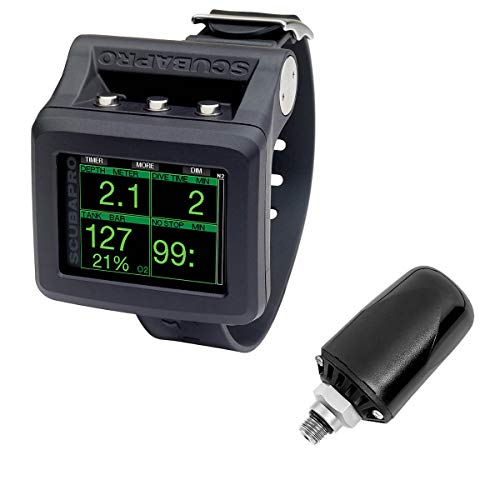
SCUBAPRO G2 Wrist Diving Computer with Transmitter
Best for: Divers who want air integration through a wireless transmitter.
This fits divers who want tank pressure shown on the wrist alongside depth and time. Owners often note that the transmitter setup takes a little practice.
Pros
- Wireless tank pressure reading on the wrist
- Good fit for single-tank reef dives
Cons
- Transmitter pairing needs careful setup
SCUBAPRO G2 Tek Wrist Dive Computer

SCUBAPRO G2 Tek Wrist Dive Computer
Best for: Technical and deeper profiles with gas planning.
Aimed at divers who plan decompression dives or switch between gas mixes. Recreational divers rarely need these modes.
Pros
- Tech-oriented gas and decompression modes
- Robust feature set for planning
Cons
- More settings to learn before the first dive
SCUBAPRO G3 Wrist Scuba Dive Computer with Transmitter Smart + Pro

SCUBAPRO G3 Wrist Scuba Dive Computer with Transmitter Smart + Pro with Bluetooth® and Watch-Style Color Display, Includes Case, Silicone Arm Strap, USB Cable, Charging Dongle and Lanyard
Best for: Divers who log dives on a phone over Bluetooth.
This suits divers who want to sync logs and review profiles after a trip. The color display is easier to read in some water conditions.
Pros
- Bluetooth syncing for dive logs
- Color display with a watch-style layout
Cons
- Pairing and app setup add steps
SCUBAPRO Luna 2.0 Air Integrated Wrist Scuba Dive Computer

SCUBAPRO Luna 2.0 Air Integrated (AI) Wrist Scuba Dive Computer with Bluetooth®, Includes Case and Silicone Arm Strap
Best for: Air-integrated setups on a more modest feature budget.
This fits divers who want air integration and Bluetooth without the advanced tech modes. It is a practical middle option for regular recreational diving.
Pros
- Integrated air reading with Bluetooth
- Includes case and silicone arm strap
Cons
- Fewer advanced planning modes than the G2 Tek
SCUBAPRO Galileo 3 Ti Wrist Dive Computer

SCUBAPRO Galileo 3 Ti Wrist Dive Computer
Best for: Divers who want a premium build for frequent travel.
This suits divers who dive often and want a sturdier case finish. It is a higher-end pick within the Galileo line.
Pros
- Premium case finish for regular use
- Full Galileo feature set
Cons
- More than most casual divers need
Buying Guide
Air integration
Decide whether you want tank pressure on your wrist. Models with a transmitter show gas remaining without a separate gauge.
Technical capability
If you plan decompression or gas switching, choose a model with tech modes. Recreational reef divers usually do not need them.
Logging and connectivity
Bluetooth models let you download dive profiles to a phone. Check whether you want that workflow before buying.
Build and display
Color displays and premium case finishes help readability and longevity. They matter most for frequent divers.
Good picks for this: SCUBAPRO Galileo 2 Wrist Diving Computer and SCUBAPRO G2 Tek Wrist Dive Computer
FAQ
Do I need an air transmitter with a scubapro g2 wrist dive computer?
A transmitter is only needed if you want your computer to show live tank pressure and air time. If you dive without a tank pressure gauge or prefer a simpler setup, a wrist computer without air integration will still track depth, time and decompression information. Choose the transmitter models if you want that extra air data on your wrist.
Is a Tek model necessary for recreational diving?
Most recreational divers do not need the technical features of the Tek model. Those extra modes are designed for deeper dives, gas mixes and longer decompression profiles. If your diving stays within standard recreational limits, a standard G2 or Galileo model will usually cover your needs.
What is the difference between the Galileo and G2 lines?
The Galileo line is built around a more streamlined, watch-style design, while the G2 models offer a broader feature set in similar wrist formats. Both families are suited to diving with air and nitrox. Compare the specific model listings to confirm which features each version includes before you buy.
Does the G3 model support Bluetooth logging?
Yes, the G3 Smart + Pro model is listed with Bluetooth connectivity, which lets you transfer dive logs to a phone or computer. Check the product listing for the exact app and software compatibility. Bluetooth makes logging and reviewing your dives easier than manual downloads.
Should I choose a titanium case?
A titanium case, such as the Galileo 3 Ti, is generally more corrosion-resistant and feels lighter on the wrist than standard materials. It usually costs more, so it is a matter of budget and personal preference. Standard cases are still durable for regular recreational use.
Will the Luna 2.0 work for both air and nitrox diving?
The Luna 2.0 Air Integrated model is designed to display air integration data alongside standard dive information. Confirm the gas and nitrox settings in the product specifications and manual before diving. Always plan dives according to your training and the computer’s guidance.
Conclusion
For most recreational divers who want a reliable, straightforward wrist computer, the Galileo 2 is a sensible starting point. Divers who want live air data should look at the transmitter models, such as the G2 with Transmitter or the Luna 2.0 Air Integrated.
Technical divers planning deeper or more complex profiles should consider the G2 Tek, while those who want the most advanced connectivity and a premium build may prefer the G3 Smart + Pro or the Galileo 3 Ti.
Related reading
- Wrist Mounted Dive Computer: A Step-by-Step Guide for Choosing and Using One
- Wrist Mount Dive Computer: Is It Right for You? Setup and Tips
- Scubapro Sport Dive Computer: Setup, Use and Buying Tips for Reef Divers
- Scubapro Aladin One Dive Computer Manual: Setup and Key Settings Guide
- Oceanic Wrist Dive Computer: Setup, Settings and Reef Dive Tips
- Mares Smart Pro Edition Wrist Dive Computer Black/Black: 5 Best Options Compared
- 7 Best Scubapro G3 Dive Computer Models for Reef Divers (2026)
About Miles Sinclair
Miles Sinclair is part of our editorial team and reviews and edits our scuba diving gear guides, checking product details against manufacturer specifications and owner feedback.
About the author
Miles Sinclair writes reviews and buying guides for Scuba Lanai.