7 Best Scubapro G3 Dive Computer Models for Reef Divers (2026)
Compare the scubapro g3 dive computer and six related Galileo and Suunto models for reef diving. See which fits your dive style and needs.
 By Miles Sinclair
Updated November 21, 2026
 By Miles Sinclair
Updated November 2026
Choosing a scubapro g3 dive computer comes down to a few practical questions: whether you want a wrist unit or a console, how much you care about air integration and tank pressure, whether a heads-up display matters, and how well the unit holds up to salt and frequent rinsing. This list compares the G3 family and a few close alternatives on those criteria, using manufacturer specifications, brand reputation and common owner feedback patterns.
Our top picks at a glance
- 1TOP CHOICEBest overallSCUBAPRO G3 Wrist Scuba Dive Computer with Bluetooth and Watch-Style Color DisplayView on Amazon
- 2
 TOP CHOICEBest for air integrationSCUBAPRO Galileo 3 (G3) Wrist Dive Computer w/Transmitter Smart + ProView on Amazon
- 3
 TOP CHOICEBest for titanium durabilitySCUBAPRO Galileo 3 Ti Wrist Dive ComputerView on Amazon
- 4
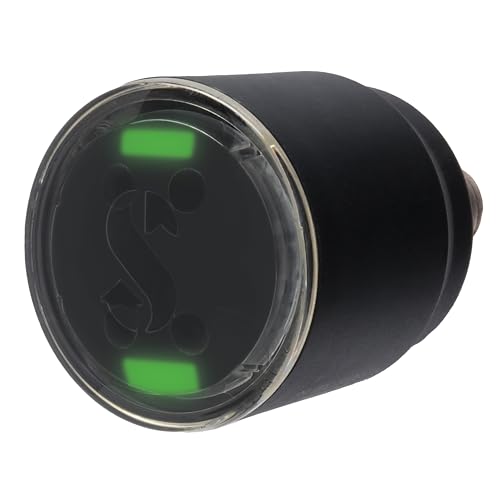 Best for upgrading an existing G3SCUBAPRO Transmitter Smart + ProView on Amazon
- 5
 Best for budget-minded diversSuunto Eon Core Wrist Dive Computer with Transmitter and USBView on Amazon
- 6
 Best for older Galileo ownersSCUBAPRO Galileo 2 Wrist Diving ComputerView on Amazon
- 7
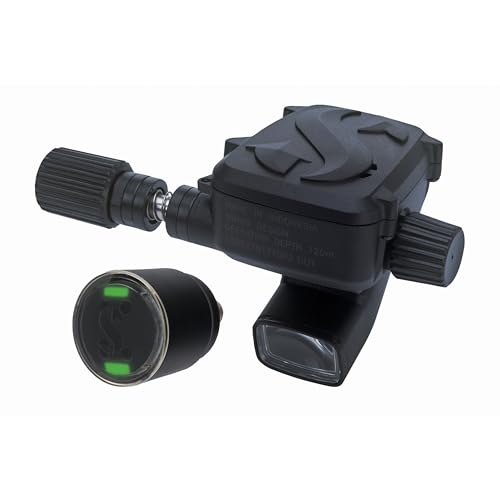 Best for heads-up displaySCUBAPRO Galileo HUD Sport Dive Computer w/Transmitter Smart + ProView on Amazon
Our Top Picks
| Product | Best for | Key feature |
|---|---|---|
| SCUBAPRO G3 Wrist Scuba Dive Computer | Overall wrist use | Bluetooth and color display |
| SCUBAPRO Galileo 3 w/Transmitter Smart + Pro | Air integration | Wireless tank pressure |
| SCUBAPRO Galileo 3 Ti | Durability | Titanium housing |
| SCUBAPRO Transmitter Smart + Pro | Upgrading a G3 | Wireless air transmitter |
| Suunto Eon Core | Budget-minded divers | Simple wrist display |
| SCUBAPRO Galileo 2 | Older Galileo owners | Familiar interface |
| SCUBAPRO Galileo HUD Sport | Heads-up display | Head-up data view |
SCUBAPRO G3 Wrist Scuba Dive Computer with Bluetooth and Watch-Style Color Display
SCUBAPRO G3 Wrist Scuba Dive Computer with Bluetooth® and Watch-Style Color Display, Includes Case, Silicone Arm Strap, USB Cable, Charging Dongle and Lanyard
Best for: Overall wrist use
This is the core G3 wrist unit for recreational divers who want a clear color display and phone pairing for logbook downloads.
Pros
- Color display with watch-style layout
- Bluetooth pairing for log transfer
Cons
- Air integration requires a separate transmitter
SCUBAPRO Galileo 3 (G3) Wrist Dive Computer w/Transmitter Smart + Pro
SCUBAPRO Galileo 3 (G3) Wrist Dive Computer w/Transmitter Smart + Pro
Best for: Air integration
Suited to divers who want tank pressure and remaining gas time on the same screen as their dive data.
Pros
- Wireless tank pressure in the main display
- Bundled transmitter saves a separate purchase
Cons
- Transmitter battery needs periodic checks
SCUBAPRO Galileo 3 Ti Wrist Dive Computer
SCUBAPRO Galileo 3 Ti Wrist Dive Computer
Best for: Titanium durability
A fit for frequent boat and shore divers who rinse hard and want a metal case that resists scratches.
Pros
- Titanium case is heavier-duty than standard polymer
- Same G3 interface and features
Cons
- Costs more than standard G3 wrist units
SCUBAPRO Transmitter Smart + Pro
SCUBAPRO Transmitter Smart + Pro
Best for: Upgrading a G3
For divers who already own a compatible G3 computer and want to add wireless air integration without replacing the unit.
Pros
- Adds wireless tank pressure to a compatible computer
- Avoids buying a full new dive computer
Cons
- Only useful with compatible SCUBAPRO computers
Suunto Eon Core Wrist Dive Computer with Transmitter and USB
Suunto Eon Core Wrist Dive Computer with Transmitter & USB, Eon Core Black, with Transmitter
Best for: Budget-minded divers
A straightforward alternative for recreational divers who want a wrist computer with a transmitter and do not need a color display.
Pros
- Simple, uncluttered display
- Includes transmitter and USB cable
Cons
- Interface feels dated next to newer G3 models
SCUBAPRO Galileo 2 Wrist Diving Computer
SCUBAPRO Galileo 2 Wrist Diving Computer
Best for: Older Galileo owners
Fits divers already comfortable with the Galileo interface who want a familiar layout rather than a full redesign.
Pros
- Familiar menu structure for existing owners
- Typically easier to find accessories for
Cons
- Older generation with fewer modern features
Buying Guide
Wrist Unit or Console
Wrist computers like the G3 models are compact, easy to read at a glance, and simple to carry on a boat or in a travel bag. Consoles mount on a hose-and-gauge setup and offer larger displays, which some divers prefer for reading multiple data points during a dive. Think about how you like to monitor your gear and whether you want everything on one wrist.
Air Integration and Tank Pressure
If you want your computer to show remaining tank pressure in real time, look for a model that pairs with a transmitter. The Galileo and G3 families use transmitters for this purpose, so factor in the cost and setup of that accessory. Divers who rely mainly on a submersible pressure gauge may not need this feature at all.
Display and Heads-Up Viewing
Color screens and heads-up displays can make information easier to read in low light or during fast-paced reef dives. Check how the display sits on your wrist or in your line of sight, and whether the layout suits how you scan your data. Simpler displays can be a benefit for newer divers who want fewer distractions.
Build Quality and Maintenance
Because dive computers spend most of their lives in salt water, durability and ease of rinsing matter. Titanium or reinforced cases tend to resist wear better, while standard housings are lighter and less expensive. Plan to rinse the unit in fresh water after every dive and check the battery and seals on a regular schedule.
FAQ
Is the scubapro g3 dive computer good for beginners?
Many newer divers find the G3 family approachable because the menus and displays can be set up for basic dive tracking. Beginners should still complete proper training and learn how to read their computer before relying on it. Choosing a model with simpler features can help reduce confusion early on.
Do I need a transmitter with a G3 computer?
A transmitter is only needed if you want to see tank pressure on your computer during the dive. Without one, you can still track depth, time, and decompression information. Decide based on whether live air monitoring fits how you dive.
Can I use a dive computer in fresh water and salt water?
Yes, most models are designed to work in both fresh and salt water, and the depth readings may need a simple setting adjustment depending on the water type. Always confirm the setting in the manual before diving. Rinsing the unit after salt water exposure helps extend its life.
How often should I service my dive computer?
Service intervals depend on the manufacturer and how often you dive, but a yearly check of seals, battery, and software is a sensible habit for regular divers. Keep an eye out for fogging, moisture inside the display, or unusual button response. Following the maker’s guidance will help keep the unit reliable.
Which model should I pick for reef diving?
Reef divers often value clear displays, reliable depth and time tracking, and easy readability during repeated shallow dives. Models with a wrist layout and optional air integration tend to suit this style well. Match the feature set to how often you dive and how much data you want in front of you.
Conclusion
If you want a straightforward wrist computer for regular reef dives and do not need live tank pressure, a basic G3 model or the Galileo 2 is a practical choice. Divers who want air integration and a more complete data set should look at the Galileo 3 with a transmitter, while those who value a rugged, premium build may prefer the titanium version.
Heads-up display fans and divers who want the most features will likely be happiest with the Galileo HUD, while buyers comparing a non-SCUBAPRO option can consider the Suunto Eon Core. Match the model to your dive style, budget, and how much information you want on your wrist.
Related reading
- Scubapro Sport Dive Computer: Setup, Use and Buying Tips for Reef Divers
- Scubapro Aladin One Dive Computer Manual: Setup and Key Settings Guide
- Zoop Suunto Dive Computer: A Step-by-Step Setup and Buying Guide
- Zoop Dive Computer Price: What to Expect and How to Shop Smart
- Wrist Mounted Dive Computer: A Step-by-Step Guide for Choosing and Using One
About Miles Sinclair
Miles Sinclair is part of our editorial team and reviews and edits our scuba diving gear guides, checking product details against manufacturer specifications and owner feedback.
About the author
Miles Sinclair writes reviews and buying guides for Scuba Lanai.