7 Best Hoseless Air Integrated Dive Computers for Reef Divers (2026)
Compare the best hoseless air integrated dive computers for reef and wreck diving. See key features, pros, cons and buying tips before you choose.
 By Miles Sinclair
Updated November 22, 2026
 By Miles Sinclair
Updated November 2026
A hoseless air integrated dive computer reads your tank pressure through a transmitter on the first stage, then sends that data to your wrist or console without a high-pressure hose running to the gauge. For most recreational divers, the selection criteria come down to four things: how the transmitter connects, how readable the display is at depth, how the unit handles air consumption math, and whether the mount suits your dive style. The picks below are based on product listings, brand reputation and common owner feedback patterns.
Our top picks at a glance
- 1TOP CHOICEBest overallMares Genius Air Integrated ComputerView on Amazon
- 2
 TOP CHOICEBest for wrist-worn trackingMares Quad Ci Wrist Dive Computer (Black/Silver) – Activity Tracking WView on Amazon
- 3
 TOP CHOICEBest for Bluetooth loggingSCUBAPRO Luna 2.0 Air Integrated (AI) Wrist Scuba Dive Computer with BView on Amazon
- 4
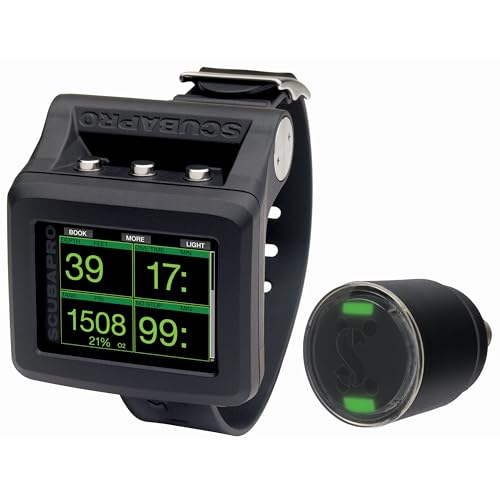 Best for a wireless bundleSCUBAPRO G2 Wrist Dive Computer and Transmitter BundleView on Amazon
- 5
 Best for a classic wrist layoutSCUBAPRO Galileo 2 Wrist Diving ComputerView on Amazon
- 6
 Best for a hoseless consoleMares Icon HD Air Integrated Hoseless Computer, Black EditionView on Amazon
- 7
 Best for hands-free viewingSCUBAPRO Galileo HUD Hands-Free Diving Computer with TransmitterView on Amazon
Our Top Picks
Quick Comparison
| Product | Best for | Key feature |
|---|---|---|
| Mares Genius Air Integrated Computer | Overall air-integrated use | Wireless air integration |
| Mares Quad Ci Wrist Dive Computer | Wrist-worn tracking | Multiple dive modes |
| SCUBAPRO Luna 2.0 Air Integrated Wrist Dive Computer | Bluetooth logging | Bluetooth connectivity |
| SCUBAPRO G2 Wrist Dive Computer and Transmitter Bundle | Wireless bundle buyers | Included transmitter |
| SCUBAPRO Galileo 2 Wrist Diving Computer | Classic wrist layout | Simple wrist display |
| Mares Icon HD Air Integrated Hoseless Computer | Hoseless console use | Large high-contrast display |
| SCUBAPRO Galileo HUD Hands-Free Diving Computer | Hands-free viewing | Heads-up display |
Mares Genius Air Integrated Computer
Best for: Overall air-integrated use
This unit suits divers who want tank pressure and dive data in one wireless package without a hose run to a gauge. It is a good fit for reef divers who check air often.
Mares Genius Air Integrated Computer
- Pros: Wireless air integration; clear air-time readout
- Pros: Familiar Mares interface
- Cons: Transmitter pairing takes a careful first setup
Mares Quad Ci Wrist Dive Computer
Best for: Wrist-worn tracking
Divers who want a wrist computer that also tracks general activity between dives will find this model useful. It appeals to people who wear their computer all day.
Mares Quad Ci Wrist Dive Computer (Black/Silver) – Activity Tracking Watch w/Multiple Dive Modes
- Pros: Multiple dive modes
- Pros: Activity tracking when out of the water
- Cons: Wrist display is smaller than a console screen
SCUBAPRO Luna 2.0 Air Integrated Wrist Dive Computer
Best for: Bluetooth logging
Divers who sync logs to a phone after each dive will appreciate the Bluetooth link. It works well for people who review profiles and track air use over a season.
SCUBAPRO Luna 2.0 Air Integrated (AI) Wrist Scuba Dive Computer with Bluetooth®, Includes Case and Silicone Arm Strap
- Pros: Bluetooth connectivity for log transfer
- Pros: Air integration in a wrist format
- Cons: Smartphone app setup adds a step
SCUBAPRO G2 Wrist Dive Computer and Transmitter Bundle
Best for: Wireless bundle buyers
Buyers who want the computer and transmitter sold together will find this bundle simpler to start with. It suits divers building a complete air-integrated setup in one purchase.
SCUBAPRO G2 Wrist Dive Computer and Transmitter Bundle
- Pros: Transmitter included in the bundle
- Pros: Established SCUBAPRO display layout
- Cons: Bundle contents may vary by seller
SCUBAPRO Galileo 2 Wrist Diving Computer
Best for: Classic wrist layout
Divers who prefer a traditional wrist display and straightforward menus will find this model easy to read. It fits well for recreational diving with set depth limits.
SCUBAPRO Galileo 2 Wrist Diving Computer
- Pros: Simple, readable wrist display
- Pros: Straightforward button layout
- Cons: Confirm air integration support for your exact configuration
Mares Icon HD Air Integrated Hoseless Computer
Best for: Hoseless console use
Divers who prefer a console-style display over a wrist unit will find this model useful. It works for people who want a larger screen and a dedicated air-integrated layout.
Mares Icon HD Air Integrated Hoseless Computer, Black Edition
- Pros: Hoseless design reduces hose clutter
- Pros: Larger, high-contrast display
- Cons: Console mounting adds bulk to the rig
Buying Guide
Transmitter Connection and Reliability
The transmitter screws onto your first stage and sends tank pressure wirelessly to the computer. Check that the transmitter pairs with the computer you choose and that the system is compatible with your regulator’s first-stage port. Ask your local shop to confirm fit before you buy, since mismatched threads or port types are a common frustration.
Display Readability at Depth
Look for a clear, high-contrast screen that you can read quickly in low light and at a glance during a dive. Color or backlit displays can help when visibility is poor or when you need to check air at a glance without stopping your ascent. Consider how much information appears at once, since a cluttered screen slows you down underwater.
Air Consumption and Remaining Gas Calculations
Many hoseless units estimate how long your remaining air will last based on your recent breathing rate and depth. Pay attention to how the computer calculates reserve and how clearly it warns you when you reach your set threshold. Good air-time estimates help you plan safe ascents and avoid surprises on reef dives.
Mounting Style and Dive Setup
Wrist-mounted units keep your data in view and are easy to check during a dive, while console or hands-free models can suit divers who prefer their gauges out of the way. Think about whether you already wear a computer on your wrist, whether you use a bungee or console setup, and how comfortable the strap or mount feels over a full day of diving. Trying the mount with your exposure suit on, if possible, can save you trouble later.
FAQ
What is a hoseless air integrated dive computer?
It is a dive computer that receives tank pressure wirelessly from a transmitter on your first stage, so you do not need a high-pressure hose running to a separate gauge. The computer then displays your air supply alongside depth, time and decompression data. This setup reduces hose clutter and the risk of a hose failure during a dive.
Do I need a transmitter for every hoseless computer?
Yes, most hoseless air integrated systems require a transmitter that mounts on your first stage to read tank pressure. Some computers come bundled with a transmitter, while others must be purchased separately. Always confirm whether the transmitter is included before you order.
Can I use a hoseless computer with any regulator?
Not always, because the transmitter must fit your first-stage port and thread type. Check the compatibility notes for each model and confirm with your dive shop or the manufacturer. A quick fit check before your trip can prevent problems on the day of your dive.
How do I change the battery in a hoseless transmitter?
Most transmitters use a replaceable battery that is accessed by removing a cover or cap on the unit. Follow the manufacturer’s instructions for opening and sealing the housing, and make sure the O-ring is clean and properly seated. Keeping spare batteries on hand is a good habit before longer diving trips.
Is a wrist-mounted or console-mounted computer better for reef diving?
Wrist-mounted computers are popular because they are easy to read at a glance and keep your gas information visible throughout the dive. Console options can work well for divers who prefer a streamlined setup or who want their gauges closer to their body. The best choice depends on your comfort, your existing gear and how often you check your computer during a dive.
Do hoseless computers need regular servicing?
Yes, both the computer and the transmitter should be rinsed in fresh water after each dive and inspected for seal wear. Manufacturers typically recommend periodic professional servicing and battery checks to keep pressure readings accurate. Following the maintenance schedule in the user manual helps extend the life of your equipment.
Conclusion
Divers who want a wrist-mounted, easy-to-read display with a simple transmitter setup should look first at the wrist-style options in the list above. Those who prefer a streamlined console or hands-free arrangement will find better matches among the integrated and HUD-style models, especially if they already use that mounting style.
Before you buy, confirm that the transmitter fits your regulator, check whether the transmitter is included, and try the mount with your exposure suit if you can. Matching the computer to your dive style and gear will make the biggest difference on reef dives.
Related reading
- Suunto Air-Integrated Dive Computer: Setup, Tips and Buying Guide
- Shearwater Air Integrated Dive Computer: Setup, Use and Buying Tips
- Scuba Dive Computer Air Integrated: How to Choose and Set One Up (2026)
About Miles Sinclair
Miles Sinclair is part of our editorial team and reviews and edits our scuba diving gear guides, checking product details against manufacturer specifications and owner feedback.
About the author
Miles Sinclair writes reviews and buying guides for Scuba Lanai.