6 Best Dive Computers for Scuba and Freediving: Buyer’s Guide
Compare 6 dive computers for scuba and freediving, with specs, pros, cons and buying tips to help you choose the right dive computer for your dives.
 By Miles Sinclair
Updated November 23, 2026
 By Miles Sinclair
Updated November 2026
Choosing a dive computer for scuba and freediving means finding one device that handles both air-based bottom time tracking and breath-hold depth and surface interval logging without getting in your way. Many divers want one wrist unit that switches modes cleanly, while others need a simpler console-style gauge for reef work. This guide compares six models from the Amazon US listings we selected. Our criteria were the scuba and freediving modes the manufacturer lists, the controls and display clarity, the battery and charging approach, the logbook and download options, and the general owner feedback patterns we could find. We did not test these units ourselves.
Our top picks at a glance
- 1TOP CHOICEBest overallSeac Action, Dive Computer with Scuba and Freediving Mode, Dive LogbooView on Amazon
- 2
 TOP CHOICEBest for dedicated freediversSEAC Partner, Wrist-Mount Freediving ComputerView on Amazon
- 3
 TOP CHOICEBest for deep stops and log downloadsCressi Donatello Scuba Dive Computer, Single-Button Interface, Freediving Gauge ModeView on Amazon
- 4
 Best budget pickMares Puck Lite Scuba Diving Computer, Watch-Style One Button ControlView on Amazon
- 5
 Best for nitrox usersCressi Leonardo 2.0 G2 Dive Watch, One-Button Air Nitrox GaugeView on Amazon
- 6
 Best for color display and BluetoothCressi Da Vinci Dive Computer, 120m Depth Rating, Compass, Black/BlueView on Amazon
Our Top Picks
Quick Comparison
| Product | Best for | Key feature |
|---|---|---|
| Seac Action | Divers who want scuba and freediving in one unit | Dedicated freediving mode with logbook and planner |
| SEAC Partner | Dedicated freedivers | Wrist-mount freediving computer |
| Cressi Donatello | Divers who download logs and use deep stops | Selectable deep stops and Windows/Mac log export |
| Mares Puck Lite | Budget-minded recreational divers | Single-button watch-style control |
| Cressi Leonardo 2.0 G2 | Nitrox divers | Adjustable oxygen fraction and PO2 settings |
| Cressi Da Vinci | Shore divers who want a color screen | Full-color LCD with Bluetooth |
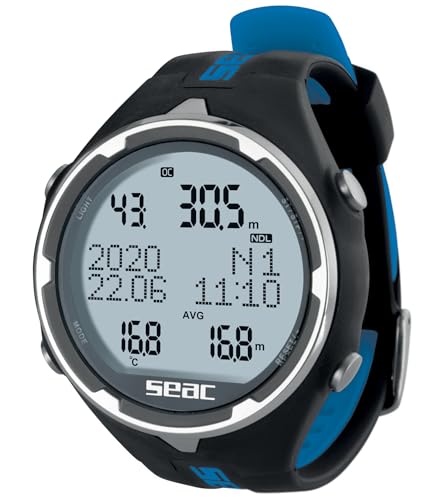
Seac Action, Dive Computer with Scuba and Freediving Mode, Dive Logbook, Dive Planner, Safety Alarms
Seac Action, Dive Computer with Scuba and Freediving Mode, Dive Logbook, Dive Planner, Safety Alarms, Standard, black/blue
Best for: Best overall
This is a good fit for recreational divers who also snorkel deep or freedive occasionally and want one device covering both activities without buying a second unit.
Key specs
- Scuba mode and freediving mode in one unit
- Built-in dive logbook and dive planner
- Safety alarms
- Standard size, black/blue colorway
Pros
- Covers both scuba and freediving modes
- Logbook and planner are useful for tracking dive series
- Alarms help enforce planned limits
Cons
- Multi-mode menus take time to learn before a first dive
- Owners sometimes mention that the display is small in low light
Bottom line: A strong pick for divers who want one dual-purpose computer and are willing to spend a short session learning the menus.
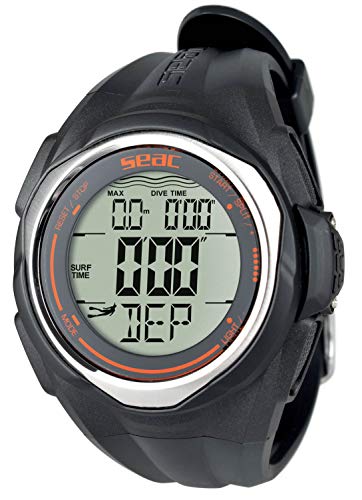
View on AmazonSEAC Partner, Wrist-Mount Freediving Computer
SEAC Partner, Wrist-Mount Freediving Computer, Black, one Size
Best for: Best for dedicated freedivers
Intended for breath-hold divers who want a focused wrist unit rather than a scuba-first device with a freediving add-on.
Key specs
- Wrist-mount design
- Freediving computer function
- Black, one size
Pros
- Purpose-built for breath-hold depth and time tracking
- Wrist mounting keeps the unit accessible during a dive
- Simple focus reduces menu clutter
Cons
- Not intended as a primary scuba computer
- Limited for divers who need full decompression tracking
Bottom line: Choose this if freediving is your main activity and scuba is secondary.
View on AmazonCressi Donatello Scuba Dive Computer, Single-Button Interface, Freediving Gauge Mode
Cressi Donatello Scuba Dive Computer, Single-Button Interface, Black/Blue | Freediving Gauge Mode, User-Selectable Deep Stops, Windows & Mac Logs, User-Changeable Battery, Dive Watch for Fall Dives
Best for: Best for deep stops and log downloads
Suits divers who want adjustable deep stops, a freediving gauge mode, and the ability to export logs to a computer.
Key specs
- Single-button interface
- Freediving gauge mode
- User-selectable deep stops
- Windows and Mac log compatibility
- User-changeable battery
Pros
- Deep stop options suit more conservative profiles
- User-changeable battery reduces service trips
- Log export helps with record keeping
Cons
- Single-button control takes practice to navigate
- Log software compatibility should be confirmed for your OS version
Bottom line: Pick this if you want configurable deep stops and log downloads without paying for extras.
View on AmazonMares Puck Lite Scuba Diving Computer, Watch-Style One Button Control
Mares Puck Lite Scuba Diving Computer | Watch-Style One Button Control Underwater Freediving Scuba Diving Computer – Aqua
Best for: Best budget pick
A compact, watch-style unit for recreational divers who want basic scuba and freediving functions with minimal controls.
Key specs
- Watch-style design
- One-button control
- Scuba and freediving use
- Aqua colorway
Pros
- Simple one-button operation
- Compact and comfortable on the wrist
- Suitable for beginners learning dive planning basics
Cons
- Fewer advanced settings than premium models
- Not suited to technical or nitrox-intensive diving
Bottom line: A sensible choice for newer recreational divers who want an uncomplicated computer.
View on AmazonCressi Leonardo 2.0 G2 Dive Watch, One-Button Air Nitrox Gauge
Cressi Leonardo 2.0 G2 Dive Watch, One-Button Air Nitrox Gauge, White/Black | Dive Computer, Scuba Watch, FO2 21%-50%, PO2 1.2-1.6 bar, 3 Conservatism Levels, Deep Stop, CNS Indicator
Best for: Best for nitrox users
Designed for divers who use enriched air and want to set oxygen fraction and oxygen partial pressure limits.
Key specs
- Oxygen fraction range 21% to 50%
- PO2 range 1.2 to 1.6 bar
- Three conservatism levels
- Deep stop function
- CNS indicator
Pros
- Clear nitrox settings for enriched air diving
- Three conservatism levels allow profile adjustment
- Deep stop and CNS tracking included
Cons
- Setup requires careful reading of the gas settings before diving
- Older design may lack the screen clarity of newer models
Bottom line: Best for divers who regularly dive nitrox and want those settings clearly available.
View on AmazonCressi Da Vinci Dive Computer, 120m Depth Rating, Compass, Black/Blue
Cressi Da Vinci Dive Computer, 120m Depth Rating, Compass, Black/Blue | Full-Color LCD, Bluetooth, 25-Hour Battery, 4 Nitrox Mixes, Freediving Watch, Wrist Dive Computer, for Fall Shore Dives
Best for: Best for color display and Bluetooth
A feature-rich wrist computer for shore divers who want a full-color screen, a compass, and wireless data transfer.
Key specs
- 120 m depth rating
- Full-color LCD
- Bluetooth connectivity
- 25-hour battery life per manufacturer
- Four nitrox mixes
- Compass and freediving watch mode
Pros
- Full-color display is easy to read
- Bluetooth simplifies log transfer
- Compass is useful for shore navigation
Cons
- Feature set means a longer learning curve
- Battery life depends on how often features are used
Bottom line: A good choice for shore divers who want modern display and connectivity features.
View on AmazonBuying Guide
Scuba and freediving mode support
Check whether the unit explicitly lists both modes. A scuba-first computer with a basic freediving add-on may handle breath-hold timing differently than a dedicated freediving device. Read the mode list in the manufacturer’s specification before buying.
Good picks for this: Seac Action, SEAC Partner
Display and readability
Look at the screen type and how it performs in low light and at depth. Monochrome LCDs are often easier to read in plain daylight, while color screens can show more information at once. Consider whether you will read the unit while wearing a mask.
Good picks for this: Cressi Da Vinci, Mares Puck Lite
Controls and ease of use
Single-button units are simple but require practice to navigate menus. Multi-button units offer more options but take longer to learn. Try navigating the menus on land before your first dive with the unit.
Good picks for this: Mares Puck Lite, Cressi Donatello
Nitrox and gas settings
If you plan to dive enriched air, confirm the oxygen fraction range and PO2 limits. Make sure the unit lets you set these before the dive and displays the relevant warnings.
Good picks for this: Cressi Leonardo 2.0 G2, Cressi Da Vinci
Battery and charging
Some models use user-replaceable batteries, while others require service. Check the stated battery life and whether you can replace the battery yourself. Battery life depends on the features you use, so treat manufacturer figures as estimates.
Good picks for this: Cressi Donatello, Cressi Da Vinci
Logbook and data transfer
If you want to track dives over time, look at logbook functions and how data is exported. Confirm that log software works with your computer’s operating system before buying.
Good picks for this: Seac Action, Cressi Donatello
Durability and water rating
Check the stated depth rating and the build. Divers who plan deeper dives should pick a unit with a depth rating well beyond their planned depths. Rinse the unit in fresh water after every dive and keep the seals clean.
Good picks for this: Cressi Da Vinci, Cressi Leonardo 2.0 G2
FAQ
Can one dive computer handle both scuba and freediving?
Some models list both modes. Check the manufacturer’s mode list, since a dedicated freediving unit may suit breath-hold divers better.
Is a wrist dive computer better than a console?
A wrist unit is easier to read during a dive, while a console can show more data at once. Your choice depends on the dives you plan to do.
Do I need nitrox settings?
Only if you plan to dive enriched air. Recreational air divers can often skip these settings.
How often should a dive computer be serviced?
Follow the manufacturer’s service interval and have the unit checked after any impact or water intrusion. Consult a certified dive professional or authorized service center for repairs.
Can I replace the battery myself?
Some models allow user battery changes, while others require a service center. Check the owner’s manual for your model before attempting a replacement.
Should I use the computer for planning as well as during the dive?
Yes, many divers use the planning function before a dive series. Always follow your training agency’s guidance and consult a qualified instructor if you are unsure how to use the computer safely.
Conclusion
For a balanced dual-mode unit, the Seac Action is a practical starting point. Dedicated freedivers may prefer the SEAC Partner. Divers who want deep stops and log downloads should look at the Cressi Donatello. Budget-minded recreational divers may find the Mares Puck Lite sufficient. Nitrox divers should consider the Cressi Leonardo 2.0 G2, and shore divers who want a color screen and Bluetooth may prefer the Cressi Da Vinci. Confirm the specifications on each listing before purchasing.
Sources
- Diving safety resources and dive planning guidance (noaa.gov)
- Guidance on water safety and breath-hold risks (cdc.gov)
- Underwater and diving safety information for recreational divers (nps.gov)
Related reading
- Scuba Regulator with Dive Computer: 6 Steps to Match and Set Up
- Scuba Diving Dive Computer: 6 Steps to Choose and Use One Safely
- Scuba Dive Computer Console: How to Choose and Set One Up (2026)
- Scuba Dive Computer Air Integrated: How to Choose and Set One Up (2026)
- 6 Best Scuba Dive Computer Picks for Reef Divers (2026)
About Miles Sinclair
Miles Sinclair is part of our editorial team and reviews and edits our scuba diving gear guides, checking product details against manufacturer specifications and owner feedback.
About the author
Miles Sinclair writes reviews and buying guides for Scuba Lanai.