7 Best Dive Computers for Recreational Diving (2026): Our Picks
Find the best dive computer for recreational diving. We compare seven models on display, air and nitrox modes, wireless support and ease of use for reef dives.
 By Miles Sinclair
Updated November 21, 2026
 By Miles Sinclair
Updated November 2026
The best dive computer for recreational diving is the one you will read clearly at depth, understand without a manual, and trust on a repetitive reef profile. The criteria below focus on display legibility, air and nitrox modes, ease of setup, battery and charging, wireless tank pressure support, and how each unit fits recreational limits. Every listing here is a real Amazon product, and the selection is based on manufacturer specifications, brand reputation and common owner feedback patterns rather than hands-on testing.
Our top picks at a glance
- 1TOP CHOICEBest overallShearwater Research Peregrine Dive ComputerView on Amazon
- 2
 TOP CHOICEBest for budget-minded diversCressi Leonardo 2.0 Scuba Dive WatchView on Amazon
- 3
 TOP CHOICEBest for tank pressure monitoringSUUNTO D5 Dive ComputerView on Amazon
- 4
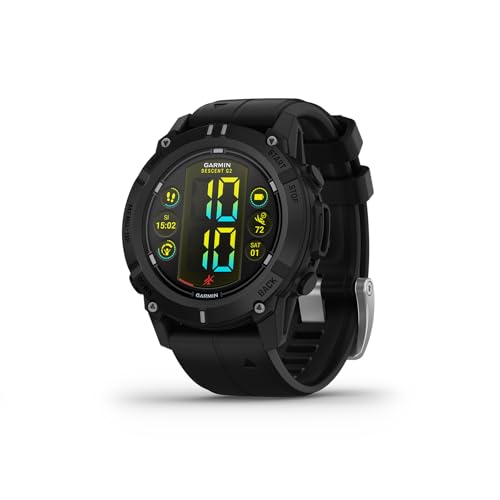 Best for a full-featured wrist displayGarmin Descent G2View on Amazon
- 5
 Best for a compact, simple interfaceMares Sirius Watch-Style Wrist Dive ComputerView on Amazon
- 6
 Best for a console-style unitMares Puck Pro Ultra Dive ComputerView on Amazon
- 7
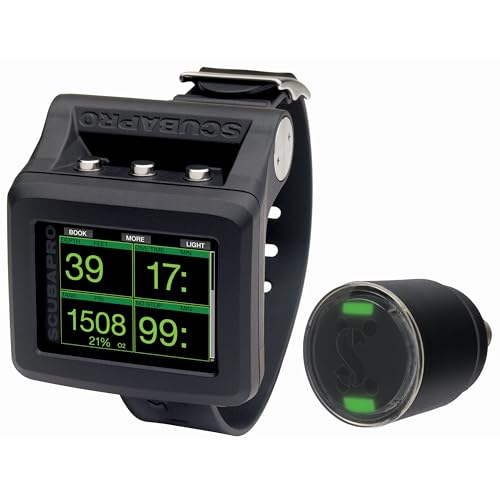 Best for wireless air integrationSCUBAPRO G2 Wrist Dive Computer and Transmitter BundleView on Amazon
Our Top Picks
Quick Comparison
| Product | Best for | Key feature |
|---|---|---|
| Shearwater Research Peregrine | Overall capability | Large, customizable display |
| Cressi Leonardo 2.0 | Budget-minded divers | Single-button control |
| SUUNTO D5 | Tank pressure monitoring | Wireless tank pressure support |
| Garmin Descent G2 | Full-featured wrist display | AMOLED screen, dive log |
| Mares Sirius | Compact, simple interface | Watch-style wrist design |
| Mares Puck Pro Ultra | Console-style unit | Air and nitrox modes |
| SCUBAPRO G2 Bundle | Wireless air integration | Transmitter included |
Shearwater Research Peregrine Dive Computer
Shearwater Research Peregrine Dive Computer
Best for: Overall capability
This suits divers who want a large, highly readable display and room to grow into more advanced diving.
Pros
- Large display that is easy to read at depth
- Customizable settings for varied dive profiles
Cons
- More settings than a casual reef diver may need
Cressi Leonardo 2.0 Scuba Dive Watch
Cressi Leonardo 2.0 Scuba Dive Watch, Single-Button Air Nitrox Gauge, Black | Dive Computer, Air Nitrox Gauge Modes, Single-Button Control, Visual & Audible Alarm, USB & Infrared Transfer, Diving Watc
Best for: Budget-minded divers
A straightforward choice for new recreational divers who want air and nitrox modes without a complicated interface.
Pros
- Single-button control keeps operation simple
- Visual and audible alarms for ascent and limits
Cons
- Fewer advanced features than premium models
SUUNTO D5 Dive Computer
SUUNTO D5 Dive Computer, Color Display 100m Waterproof, All Black | Wireless Tank Pressure Support, Vibration Alarm, Digital Compass, Extensive Scuba&Freedive Features, Up to 12H Diving Time
Best for: Tank pressure monitoring
Best suited to divers who want their air supply data on the wrist without juggling a separate gauge.
Pros
- Wireless tank pressure support, per manufacturer specifications
- Digital compass and vibration alarm
Cons
- Pairing a transmitter adds setup steps
Garmin Descent G2
Garmin Descent™ G2, Watch-Style Dive Computer, 46mm, Black | AMOLED Display, Built for Diving, Multiple Dive Modes, Dive Log, Eco-Friendly Design, Advanced Training Features
Best for: Full-featured wrist display
A good fit for divers who also use a watch for daily activities and want a bright AMOLED screen.
Pros
- AMOLED display with multiple dive modes
- Built-in dive log and training features
Cons
- Larger case may feel bulky under a thin wetsuit sleeve
Mares Sirius Watch-Style Wrist Dive Computer
Mares Sirius Watch-Style Wrist Dive Computer for Recreational Divers | Underwater, Snorkeling/Scuba Diving Accessory, Black/Black
Best for: Compact, simple interface
Suited to recreational divers who want a discreet wrist unit with fewer menus to navigate.
Pros
- Watch-style design sits comfortably on the wrist
- Straightforward modes for recreational dives
Cons
- Display detail is more limited than larger units
Mares Puck Pro Ultra Dive Computer
Mares Puck Pro Ultra Dive Computer – Air, Nitrox, Depth, Decompression, Temperature, Time, Dive Data
Best for: Console-style unit
A practical option for divers who prefer a console mounted to the gauge hose rather than a wrist unit.
Pros
- Air and nitrox modes with depth and time readouts
- Compact body that clips to a console
Cons
- Small screen can be harder to read in low light
Buying Guide
Display Legibility
A dive computer is only useful if you can read it quickly at depth, in low light, and with a mask on. Look for high-contrast screens with large numerals, and consider whether you prefer a color display or a simpler monochrome layout. Watch-style units are often easier to glance at during a dive than small handheld consoles.
Air, Nitrox, and Gas Modes
Confirm that the computer supports the gas types you plan to use. Many recreational divers start on air and move to nitrox, so a unit that handles both air and enriched air nitrox with adjustable oxygen percentages gives you room to grow. Check how easily you can switch modes before a dive.
Ease of Setup and Use
Simpler controls reduce mistakes, especially for newer divers. Single-button or few-button interfaces are straightforward, while touchscreen or multi-menu designs can offer more features but take longer to learn. Try to choose a computer whose basic functions you can operate without digging through a manual.
Battery Life and Charging
Think about how often you dive and how easy it is to recharge or replace the battery. Some units use rechargeable batteries with USB charging, while others use replaceable batteries. Plan for enough battery life to cover a full dive trip without running low between days.
Wireless Tank Pressure and Extra Features
If you want to monitor your air supply without a separate gauge, look for wireless transmitter support. Extras such as dive logs, compass functions, and data transfer can be useful, but prioritize the features you will actually use. Make sure the computer fits recreational limits and the training level you hold.
FAQ
Do I need a dive computer if I am only diving recreationally?
Yes, a dive computer is strongly recommended for recreational diving because it tracks depth, time, and decompression status in real time. It helps you stay within no-decompression limits and plan safe ascents. Many training agencies also expect divers to use one.
What is the difference between air and nitrox modes?
Air mode uses standard atmospheric composition for decompression calculations, while nitrox mode accounts for a higher oxygen percentage in the breathing gas. Nitrox can extend your bottom time in some profiles, but you need appropriate training to use it. Always set the mode and oxygen percentage to match the gas in your tank.
Should I choose a wrist unit or a console unit?
Wrist units are convenient, easy to glance at, and often include extra features like logs and compasses. Console units can be larger and easier to read at a glance for some divers, and they may connect to gauges and transmitters. Your choice depends on personal comfort and how you plan to monitor your gear.
How important is wireless tank pressure monitoring?
Wireless tank pressure monitoring lets you see your remaining air on the same display as your depth and time, which can improve awareness during a dive. It is helpful but not essential, and a traditional pressure gauge is still a reliable backup. Consider it especially if you prefer a streamlined setup.
Can I use a dive computer for technical or deeper diving?
Most of the models in this roundup are designed for recreational limits, so check each unit’s stated depth and gas capabilities before planning deeper or more complex dives. Technical diving usually requires specialized computers and additional training. Always stay within the limits of your certification and your computer.
How often should I service or replace my dive computer?
Rinse your computer with fresh water after every dive, keep seals clean and lubricated as the manufacturer recommends, and check the battery regularly. Have the unit serviced according to the maker’s schedule, and replace it if the display, buttons, or sensors show signs of wear. Follow the manufacturer’s guidance for pressure testing and warranty requirements.
Conclusion
Divers who want the most capable, well-supported option with a clear display and advanced features should look at the top-tier units in this roundup, while those seeking a simpler, budget-friendly computer for air and nitrox will find solid value in the more straightforward models. Choose based on how you plan to dive, how much you want to learn at first, and which controls feel most comfortable to you.
Newer recreational divers who value easy operation may prefer a single-button or simple interface, while those who want wireless tank data and logging should focus on watch-style units with those capabilities. Whatever you choose, read the manual, practice the setup on land, and dive within your training and the computer’s stated limits.
Related reading
- Which Is the Best Dive Computer for Technical Diving? 5 Factors to Check
- Best Recreational Dive Computer: 6 Factors That Matter for Reef Divers (2026)
- Best Dive Computer for Tech Diving: 5 Factors That Matter (2026)
- Top 6 Oceanic Pro Plus 4 Dive Computer Options for Reef Divers
- Top 3 Apeks DSX Dive Computer Options Compared for Reef Divers
About Miles Sinclair
Miles Sinclair is part of our editorial team and reviews and edits our scuba diving gear guides, checking product details against manufacturer specifications and owner feedback.
About the author
Miles Sinclair writes reviews and buying guides for Scuba Lanai.